
Help
What is idols.cam
idols.cam is a new generation of social platform, through which creators and their fans connect. On idols.cam, each creator has a wide range of options for communicating with their fans and monetising their content. (Free publication, restricted to registered fans, VIP subscription, exclusive content on demand via private and secure messaging, live chat, additional bonuses, etc.)
How can I have video session with a creator?
To access the video chat, you need to add a creator to your favourites by clicking on their profile via the timeline and have credits on your E-wallet. If the creator is online, a button will appear on their profile page. Click to enter the video chat. You can watch and hear the creators (if their sound is on), you can talk with them via instant text messages and creators can answer back in the same way or by voice (if sound is enabled on the creator side).
What services are free?
- Free video sessions - In this part of the website you can chat with creators via message, hear and view them for free.
- Free registration - Creating an account is completely free, as soon as you are registered, you can enjoy free chat and free messaging without interruptions. Click here to join.
- Access to the timeline of creators you follow or suggested creators.
- Free creators pictures - Every creator has a personal images gallery that can be viewed for free by accessing their "Complete Profile." Every creator decides solely which and how many photos they post on their gallery.
- Free creators videos - Every creator has the option to promote themselves by recording free videos that will appear in their Profile page. These videos can be watched for free. If no video appears on a profile it means that the creator has not published any videos.
- Free messages - you can send/receive free messages to/from any creator if you have added them to your favourites
- Free emoticons - You can send emoticons chat anytime.
- Put a ‘Love’ on their posts, videos and photos
- Add your favourite creators to your Favourites.
What are the paid services?
Creators sell their services in their private zone. All services sold by creators can be paid for with credits from your e-wallet. It is a secure and anonymous payment method. There are no additional costs for adding credits to the e-wallet.
List of paid services:
* Bonus
* Virtual gifts: a jewel, a rose and many more
* Request an action from the creator. Ex. A striptease
* Interactive sex toy - short or long vibration
* Toy Controller in Private Xclusive Show
* Become a VIP member
* Sneakpeek - take a look at the show
N.B .: If the creator does not offer some of these paid services, it is because the creator has chosen not to activate them. We suggest you talk to him about it.
I already have an account on idols.cam, what do I do now?
If you have an account, you can add credits to make the most of all the advantages of idols.cam. Click here to access all the means of payment available in your country.
What is the E-Wallet? How do I add credits to my E-Wallet?
It is a simple, anonymous and completely secure way to pay for model services. At any time, you can see the credits available in your E-Wallet.
Step by Step instructions:
- log-in to your account,
- Click on Add credits button,
- Choose your desired payment method (credit card, phone, SMS, etc.):
- For credit card billing, select desired credits package and press the Credit Card Payment button. On the next page add your credit card details, click the Submit button and you're done (if transaction is successful).
- For Phone or SMS billing, check the details provided on the "Upload Credits" page - "Phone / SMS" section. Note: If you do not see a Phone / SMS billing option, it means that this payment method isn't available for your country.
The same procedure applies to the case of adding extra credits to your balance.
What does"Best value"mean on the"Add Credits"page?
On the Add Credits page, there are payment methods marked with the text “Best value”. This means that you can get VIP videos of the models you want for free by choosing these payment methods.
How is my privacy secured?
Your personal data is always protected and we highly respect your privacy.
See also our Privacy Policy.
Are there any recurring fees?
No, there are no recurring charges.
Which type of credit card can I use to pay on the site?
You can use any credit or debit card that has a CVV/CVC code.
Are my credit card details secure?
Yes, idols.cam uses a totally secure connection. Your personal and credit card data is encrypted, guaranteeing complete security.
Why is the date I made a purchase with my credit card on idols.cam not the same as on my bank statement?
Transaction dates can differ slightly depending on your bank.
I can no longer use my credits and I’m being asked for my ID. Why?
If there is suspicion of fraud or unauthorised transactions, idols.cam will carry out an identity check.
This is mentioned in the General Terms and Conditions of Use that you signed when you created your account (art. 10).
What if I need technical support or information for adding credits to my E-Wallet?
You can reach our billing department HERE. You will be redirected to the technical support team, use this Contact only for billing related questions. Additionally a detailed credits E-Wallet FAQ is provided on that page.
In case of other problems or difficulties, fill out our Contact Form. Please be as detailed as possible in your problem description.
For Epoch billing Support page at Epoch.
How do I register?
Creating an account is free and takes a few seconds.
Just click on Sign up at the top menu, fill in the Registration Form and then click the Validate your registration button. Now your free account is ready to go. We do not require email confirmation for your free account. However, our system will automatically send you an email -- the email will contain your account user name and password.
Keep your log in details in a safe place.
I have not yet received the email confirming my account creation. What to do ?
If you have not received the confirmation email, log into your account, select "My Account - Personal Information" and then click on "Click here to receive the confirmation email".
Can I create multiple accounts?
Yes, as long as you don't use these accounts for inappropriate purposes, there is no problem with it.
I lost my password, what should I do?
You may use our Lost Password form to reset your password. You'll need to provide your user name and email. We will send you a new password via email.
In case you do not receive our email; first make sure you've also checked the Spam folder, if the email is nowhere to be found, add our email address to your Contacts list (Safe list) and use "Lost Password" feature again.
How do I change my password?
You can change your password in the “Your Account” section.
I don't remember my user name, what to do?
You can create a new account, anyhow if you want to recover the one you don't remember about, please Contact Us.
Can I change my username?
Your username cannot be changed, but you may create another account with the new username that you want, using the same email address.
How do I change my email address?
To keep your account safe, this can only be done by our support team. Please Contact Us.
How can I check my credits balance?
Once logged in, your credits are displayed in the menu bar on the top right of the screen.
You can also see your credits balance by navigating to the “Your Account” page or after having clicked on Enter a Private Show from a free video Chat room with a Performer.
How do I view my latest expenses?
Your latest spending is displayed in the “Your Account” section.
How do I view my latest transactions?
Your latest transactions are displayed in the “Your Account” section.
I just made a bank wire. Why are the credits not showing in my account?
Bank wires take around 2-3 business days. After making the bank wire, do not forget to send us an e-mail at with the reference of your wire to notify us.
How to manage the reception of notifications?
By default, by creating an account on idols.cam, you also subscribe to the site notifications. If you want to unsubscribe, you can manage notifications from your Account.
How do I close my account?
Go to "Your Account" and click on the link Close my account at the bottom of the page.
I disactivated my account. Can it be reactivated?
If you want to reactivate your old account, Contact Us, you will receive a reply quickly.
I want to close my account. Can I transfer the credits to another account?
No, credits cannot be transferred to another account. If you close your account and you still have credits left, they will be lost.
Are the online creators really live?
Definitely, Yes ! All online creators are broadcasting live.
Can I exchange personal information with creators ?
We do not recommend to exchange any kind of personal information with creators such as, but not limited to: addresses, emails, phone numbers, instant messenger IDs and/or any other kinds of information. If you disregard this warning and share such information, you will be personally liable if this information is used fraudulently.
How can I find more information about a creator?
When you're on your timeline, click on the creator's name. You'll find information about the creator's age], body measurements, price per minute, personal description and other valuable information.
You can also access photos and videos (if available), their schedule (if complete), and you can see comments left by users who have already enjoyed a Private Show with this creator.
How do I send messages to a creator?
Start by creating your account, then choose a creator who interests you from the posts in your Timeline. Once on their profile page, click on the “Messaging” icon and start the conversation. You can send them messages, bonuses, and photos. The creator can send you messages, photos, and videos for free or for a fee.
How do I read a message I receive from a creator?
From the account menu, click on the Messaging button. From this page you have access to your Inbox messages and you can also check your Sent messages.
How do I know if a creator has read my message?
A green tick is displayed to the right of your message when the creator has read it.
How can I delete messages from creators in the internal messaging?
Click on the bin next to the message you wish to delete.
How do I add creators to ‘My Favourites’?
The link Add to My Favourites is available on the Profile page, for all creators (click on ‘Follow for free’). To access the Profile page, click on a creator's name on the posts published on the timeline.
I want to be alerted when one of my favourite creators logs in. Is that possible?
Yes, you can be alerted as soon as an creator you have selected in your favourites list connects.
Simply go to your Account, under the Notifications section.
You must then subscribe to notifications and choose how often you want to receive them.
Can I find out when a creator is online?
Creators are responsible for their own schedules and do not have fixed schedules. However, you can tell if they are online when they write ‘Live webcams!’ in green on their posts (under the creator's name) or on their profile page.
How do I rate creators?
You can rate a creator from 1 to 5 stars after leaving a Private Show. A notification window will ask you if you would like to rate this creator. There is no obligation to give a rating.
How do I add my comments to a creator's profile?
As with the rating option, comments are available after you're leaving a Private Session. In the notification window, below the rating stars you'll see a comment form where you can write your impressions.
Can creators stream on other platforms at the same time as they are on idols.cam?
Yes, there are creators who stream on multiple platforms at the same time. The rules of this site do not preclude this. If this bothers you, you can ask the creator in private messaging to disconnect from other platforms during your private show.
The creator did not do what I asked during the private show or in private messaging, what can I do?
idols.cam is not responsible for the performance of the creator during a private show or conversation, it is up to you to come to an agreement directly with the creator. You can also rate the private show to contribute to the evaluation of the creator.
What is a Private Session?
If you decide to buy a service from a Performer you need to enter in the Private session of the Performer. Before entering you can see the Performers price per minute it is published next to the enter button of the Private session.
Beware that every Performer is free to set up their own price and is free to decide to sell you a service or not.
If you don't have credits on you E-wallet when you click on the button enter Private session you will automatically be redirected to the page adding credits to your E-wallet.
How do I leave a Private Session?
You may exit from a Performers Private Session by pressing the Leave button or by simply navigating to a different area of the site.
Please notice that the payment system has a rounded up pay per minute. For example: if you spend 1 second in a Private Session the Performer will charge you for 1 full minute. Spending 1 minute and few seconds = the cost of 2 minutes and so on.
After leaving a Private Session you have the possibility to rate the Performers services with 1 to 5 stars as well as write a comment which will appear on that Performers Complete Profile.
What is the price per minute of a Private Session?
The price of a private session depends the Performer. The Performer sets up her own price.
You are informed of this price before entering a private session. A Performers price per minute is also visible in their Complete Profile page. All private sessions are charged by the full minute.
What is the difference between a Private Show and a 100% Xclusive Show?
When you click Enter Private Show, you have the choice between Enter Private Show or Enter 100% Xclusive Show (only for Performers who enable this feature).
During a Private Show, other users can join you.
During a 100% Xclusive Show, you will be alone with the performer and you will have their full attention.
Can I add credits to my E-Wallet without interrupting my Private session?
Yes, it is possible to add more credits to your balance while being in a Private Session. Just press the "add credits E-Wallet" button located on bottom-left side of the page. All add credits options for E-Wallet will appear in a small pop-up window. See "How do I add credits to my E-Wallet?"
How do I speak with a creator via microphone?
You can only unmute your microphone in a Private Show. Multiple users can join a creator's Private Show, but only the first user connected to the Private Show will be able to unmute their microphone.
You can mute/unmute yourself at any time. By default, this feature is always disabled.
To use this feature on an Android device, you must be using a Chrome browser; on an Apple device, you must have the iOS 12 update installed.
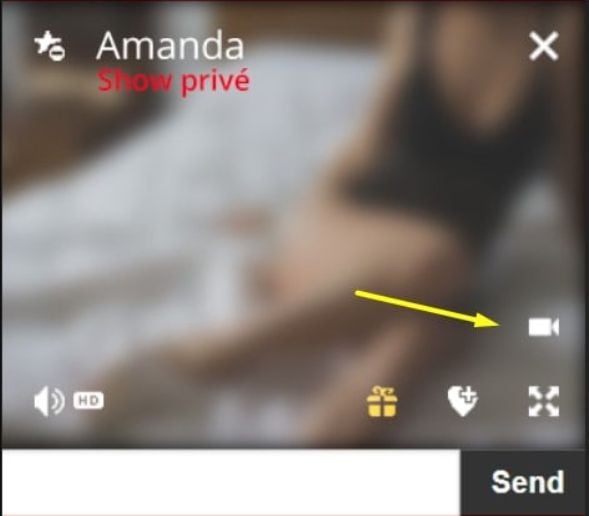
How can I share my webcam with a creator (Cam2Cam)?
The Cam2Cam feature is only available in Private Shows. Multiple users can join an idol creator's Private Show, but only the first user connected to the Private Show of a creator will be able to activate their webcam.
You can enable/disable your webcam at any time. By default, this feature is always disabled.
To use this feature on an Android device, you must use a Chrome browser; on an Apple device, you must have the iOS 12 update installed.
I plugged my microphone in however the creator can't hear me, what can I do?
- On Android products, you have to use Chrome as your browser
- On Apple products, update your device to iOS12
My webcam works but the creator can't see me, what can I do?
- On Android products, you have to use Chrome as your browser
- On Apple products, update your device to iOS12
Testing audio and webcam
If you would like to test your camera and audio, use this tester
Troubleshooting and Technical information
In case of other problems or difficulties, fill out our Contact Form. Please be as detailed as possible in your problem description.
How do I choose which camera will be active during a Private Show?
You can choose to use the front camera or the rear camera of your smartphone before entering Private Show in: “My account” > “Settings” > “Streaming settings” > “Webcam to be used”.
Recommended internet browsers
For Windows and Android, we recommend using the latest version of Google Chrome. For Mac and iOS, we recommend Safari.
The display is not normal for some parts of the site. Why?
Please test the site on a different browser than the one you normally use. We recommend that you use the latest version of Google Chrome for Windows and Android. For Mac and iOS, use Safari.
Note: Remember to clear your browser's cache and cookies before testing.
How to become a VIP Member of a creator?
If the creator has VIP content, you can subscribe to it from his Profile page, notably in the Photos & Videos tabs.The creator set their own prices; the subscription amount will be deducted monthly from your eWallet.
Important note : If you don't see the mention ‘VIP’ on the creator's Profile page, this means that this service does not exist for this creator.
How do I cancel my VIP subscriptions?
You can easily cancel your VIP subscriptions; just log-in to your account, go to “VIP subscriptions” page and use Stop re bill option - which is available for each of your subscriptions.
What are ‘Loves’?
Every visitor can love any post published on the timeline by clicking on the heart-shaped button. A user can also love photos and videos published on the creator's Profile page by clicking on the Loves button in the bottom right corner.
When it's recommended to give my "Loves"?
Well that's something to feel, not something to be informed about.
What is a bonus?
The Bonus is a small amount of money that each user, with credits on his account, can offer in the private messaging or directly from a post published on the timeline to one of the creators. Simply click on the gift-shaped button. The amount of a Bonus can vary from 0.1 to 50 Euros.
Do creators have to do anything in particular to receive a bonus?
What is offered in exchange for the bonus is at the sole discretion of the creator. You'll need to agree this together.
In what situations is recommended to send a bonus to a creator?
It's entirely up to you, For example, you can give a bonus if you want to attract the attention of the creator during your private chat, or if you want an exceptional performance in the Private Show, and also, quite simply, if you want to be kind to the creator.
Can I make special requests to creators in exchange for the Bonus?
Yes, you can always ask, but the creator is not obliged to accept. These requests must be discussed with the creators in advance in private messaging. So if you expect something in exchange for a bonus, discuss it first with the creators; it is a negotiation between you and the creators.
Definition Actions Panel
The user can request an action from the creator in private show, if the option has been enabled by the creator.
Actions are divided in 3 categories:
- VIRTUAL GIFT: The user can send the creator a virtual gift (rose, teddy bear, diamond, etc.)
- LIVE ACTION: The user can request a live action from the creator (a kiss, a dance, etc.).
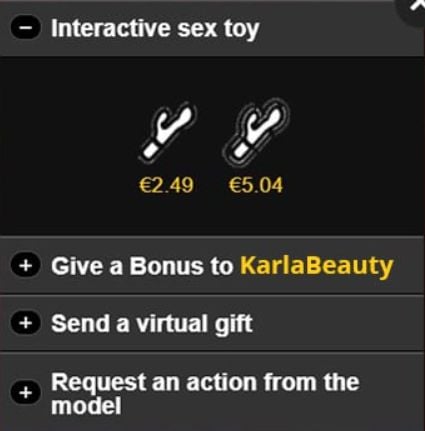
- INTERACTIVE TOY: The user can send the creator an interactive toy action (the user sends vibrations to the creator's connected sex toy).
By default, actions are disabled. If the creator wants to take advantage of these actions, he must select actions from one or more categories and enable each category.
In each category, the creator can choose a maximum of 5 items/actions. Once the creator has activated the category, it will be visible to the user, on the private live show page.
Pricing Actions Panel
Each item/action can have a different price. It is the creator who sets his own price independently.
The price will be deducted from your E-Wallet with each gift sent to the Performer or as soon as you request a specific action.
Interactive Sex Toys
This category was designed for the smart sex toy, like sound vibrators (ex. OhMiBod).
Currently there are only 2 actions available:
- Short vibrations: The user will generate a specific sound, and the creator's smart sex toy will respond by vibrating for a short period of time.
- Long vibrations: The smart sex toy will vibrate for a longer period of time.
No software is required to use the interactive sex toy.
Are you concerned that your children may have access to adult content?
To protect children from adult content, you can use these tools:
- Apple account
- Use the Family Sharing page.
- To access this: Settings on iOS or System Preferences on macOS.
- With Family Sharing, you will be able to see what each of your children is doing. Go to Content & Privacy to set restrictions on access to adult content.
- Google account
- Use Google Families from a Google page.
- Download the Google Family Link app for Android and iOS devices: you'll be able to manage how your children use their devices, and if need be put limitations on usage.
- Microsoft account
- Use the Microsoft Family Safety site to create an account.
- To configure web browsing limits: Microsoft Edge browser > Settings > Parental Control: features (such as activity reports, content filter...).
- To use multiple Microsoft accounts on a shared computer or on a Windows account: Windows settings > Accounts > Family and other users.
How can I contact your support for non-technical questions?
For E-Wallet related information please access this page: Billing Support.
For any other questions or suggestions please fill out this Contact Form.
Company info:
Shoshoro N.V., a Curaçao Corporation, does hereby voluntarily state that all performers appearing on this web site and issuing their respective sexually explicit images, were at least 18 (eighteen) years-of-age with governmental picture identity records on file in compliance with the spirit of 18 U.S.C. §2257.
Documentation as aforesaid is retained and only disclosed in conformance with Curaçao and EU Privacy Statutes.
Please direct any inquiries to:
Custodian of Records
General Platform services:
Shoshoro N.V.
Perseusweg 40
Willemstad
Curacao
kvk 144776
Click the button below to open the audio and video testing page
Open test page
Terms of Use & Security
Live Chat Support
Designed & Powered by: General Platform services / E-Wallet services © 2025-2026 Beta version
idols.cam
